









Card Sorting
A design method to figure out how people perceive information and divisions in a system.
 Bryan Zmijewski . 5 min read
The nuts and bolts: Card sorting is a user experience design technique that involves testing a group of subject experts or users to create a dendrogram or folksonomy. It’s a good way to think about information architecture, workflows, menu structure, and website navigation paths.
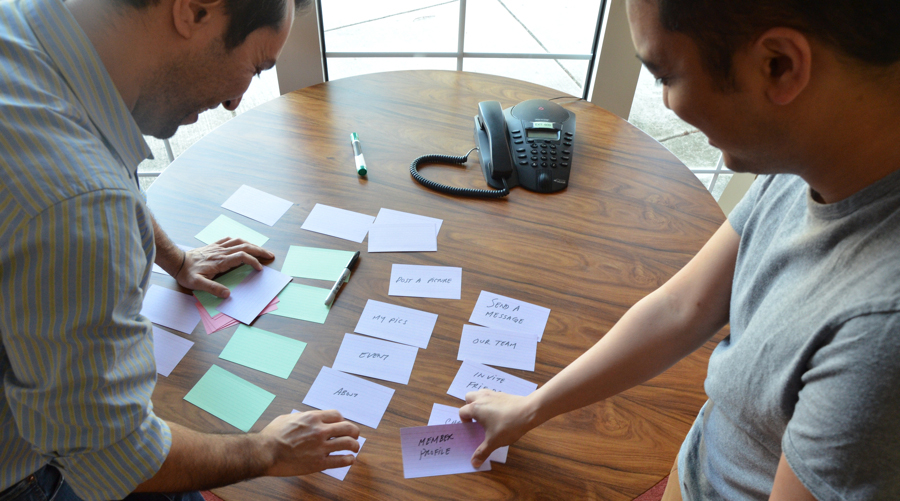
Occasionally, as designers, we have preconceived notions of how things should work, and what the flow should look like, and how things should be grouped together. This isn’t a bad thing — knowledge of our field is required to do good work, but sometimes it’s important to get an objective read on what we’re doing.
That’s why user testing and observation is important, and why we do card sorts.
A card sort is an extremely simple, but fascinating exercise. With a sharpie, some index cards, and a few people you can start to see how users would look at a system and group the information, so you can make interface decisions about things like hierarchy and navigation. We found this really useful on one of our client projects.
We performed a quick card sort to get a feel for how information was organized on the site. On 3×5 notecards, we jotted down a few dozen different concepts that people might actually interact with. It was hardly a comprehensive list, but it was enough to give us a sense of the interactions involved. By doing that, we were able to learn that some people couldn’t make heads or tails of some of the site’s more obscure terms, which were among its core features.
Had we not done a card sort, it might’ve taken longer for us to hit upon that very crucial piece of information.
Let’s Get Our Card Sort On
Doing a card sort isn’t too hard. Grab some 3×5 cards (or you can use some sticky notes) and we’ll take you through the steps. Create a list of all the information types, sections, services, and functions for your application or site. For a hypothetical social network that could include things like:
- Member Profile
- Change Password
- Invite Friends
- Our Team
- Send a Message
- Post a Picture
- My Pictures
- Event
Your list should ideally be no more than 50 items, unless you’re looking at a very data-intensive niche system.
Now, take everything you’ve listed and write them down on a regular index card. Try and keep your handwriting consistent so you don’t introduce any bias, but as long as you’re not too far afield you’re good.
- Take those cards, shuffle them, and give them to a potential user. Give them these instructions:
- Take these index cards and organize them into piles of things you think are related, or that should go together.
- There’s no right answer for how many piles you’ll have, or what you’ve piled together.
(Optional) When you’re finished, label each of your stacks by writing a name for it on this piece of printer paper and placing the stack on it. - Document that user’s results, and then repeat with (ideally) 14 more people. By doing a card sort with 15 people (some argue no more than 20 people) you can expect a correlation between them of 90% – meaning their results would be 90% consistent with the results you would get from a very, very large group of users.
As you can see card sorts are not a complicated process, nor are they time consuming to set up or execute (aside from finding 15 suitable people). The sort itself, however, is only the first part of the process.
What’s in The Stack, Man?! What’s in The Stack?!
With 15 sort results and up to 50 items in each sort, you might imagine there’s a lot to go through, and you’d be right. You will have a lot of disparate results — but probably a lot of similarities, and some surprising insights.

Understand Preconceptions
In our hypothetical example, we used a social network. In a real card sort, the results from that would be fairly predictable and would likely map to what Facebook does. If you did a card sort for a news site, you would probably get results close to the New York Times, CNN, or Fox News websites.
People have fairly strong opinions about what belongs with what, formed from years of internet use and common applications and systems, such as Facebook or CNN.com. That isn’t to say there are no insights to be found in services like that, just that you’ll see a few things that you’d expect. Where card sorts become interesting is for new services or for new features and data on established services.
Identify Consistencies
With your data set, start looking for consistencies. See what they labeled their stacks (if you had them do that step), and map similar stacks to each other. One user might have called it a “stack setting” and another might have called it an “account.” Those aren’t quite the same, but the contents of those stacks are at least as interesting as what they titled it.
When you see consistency across 5, 6, 7 users, create a potential category in a spreadsheet or another document. Don’t be afraid to create several similar categories, if you see several similar results.
Look for Outliers
In any data set, there’s an inclination to disregard outliers, to assume the user was confused or hurried. Don’t be too hasty though.
Outliers may not give you quantitative data about how users perceive your system, but they can spark new and interesting ideas. There’s not a specific science to this, but you’ll know it when you see it. An outlier can give you that Aha Moment, where something that wasn’t sitting well with you before (how you were considering organizing things, or how you structured something) suddenly makes sense in a new context.
Organize!
Card sorting can give you some good ideas (through those outliers or through unexpected commonalities) but it’s not an exercise designed to open up the problem. Card sorting helps you define information architecture and interface, very tactical things like top-level navigation, or page headers, or specific labels and copy.
With preconceptions considered, commonalities found, and outliers located you’re ready to start applying what you learned organizationally. Maybe you need to define the navigation and subnav. Maybe you didn’t know what to call the area of the site where users connect with other users. This is the specific, tactical outcome of your card sort. Whatever it is that you’ve learned from your card sort, don’t be shy about it, apply that knowledge.
Not Quite Outta the Woods Yet
Your card sort will help you get over hurdles in the interface or organization of your product, but you can’t stop here. With a sample of 15 users, you can be reasonably assured that you have solid data, but executing the results of a card sort is tricky and prone to misinterpretation.
You can validate your conclusions through user testing, which you can do with fewer people. However, it’ll take more time. If you’re doing user testing, or concept testing, ask your tester to find a specific feature or complete a task. The way you’ve organized based on the card sort should allow them to quickly identify the appropriate section or feature of your product.
What if they can’t find it? You might need to go back and figure out if the problem is with your organization or your interface. All the card sorts in the world won’t help your users find their account settings if the means of accessing that feature is hidden behind a dropdown of “Other Actions” or some similarly lazy element.
Conversely, if four out of five testers can’t sign up for an account in the right section despite obvious calls to action the problem may be with your copy, or with the sort itself. Maybe you introduced bias unintentionally, by using loaded words or phrases that don’t necessarily map to your product.
Once you’ve done that, you might have to rinse and repeat.
Practice Makes Perfect
Card sorting can be very valuable, and it’s cheap and fast to execute. Executing on a card sort is also fairly simple and tactical. The interpretation of your card sort is the tricky part and what requires practice. It requires an understanding of user behavior and expectation as well as the psychology of how people perceive words and phrases, and what they imagine a labeled card to mean.
However, practice makes perfect. Even if you can’t get 15 people, try running a card sort on your next project or redesign. The results may surprise and they may not, but you’ll learn something valuable either way.
If you want to get started quickly on a virtual card sort, you can always check out Helio’s card sort feature. Or you could get started with our easy-peasy Shopping Cart Flow template, and put that entire workflow to the ultimate test!
Shopping Cart Flow Test
Craft a purpose-driven shopping flow for your customers by validating your designs early and often.
Use this template for:
- Product Design
- Exceed user expectations for what it means to shop online.
- Sort out where users abandon or get stuck